Free WordPress plugin

Premium security.
Zero cost.

Vigilant provides enterprise-level WordPress security completely free. No premium version, no upsells, no features locked behind paywalls. Just comprehensive protection.

194
Security features
100%
Free forever
0
Data sent to third parties

Freemium security is broken

Most WordPress security plugins promise protection but lock essential features behind expensive paywalls.

⊘

Paywalled features

Two-factor authentication, security headers, file integrity monitoring... features that should be standard are often premium-only.

⧗

Delayed protection

Some plugins delay firewall rules by 30 days for free users. That's 30 days of known vulnerabilities left unpatched.

€

Hidden upsells

Constant premium upgrade prompts, limited scans, restricted logs. Free versions are crippled to push you toward paid plans.

Free features comparison

Number of security features available in free versions

Vigilant
194
AIOS
69
Wordfence
48
Sucuri
32
Solid Security
28
SG Security
27

Vigilant offers 3.9x more free features than Wordfence and 6.8x more than Solid Security

View full comparison (229 features)

Complete security suite

Twelve integrated modules working together to protect your WordPress site from every angle.

01

Firewall

Block SQL injection, XSS, file inclusion, and directory traversal attacks. Rate limiting, bad bot blocking, IP management. Proxy and Cloudflare-aware visitor IP detection. IPv4 and IPv6 allow/deny lists (exact, CIDR, wildcard). User-Agent whitelist and blacklist. Optional wp-cron.php external block to stop cron-spam DoS abuse.

02

Two-factor auth

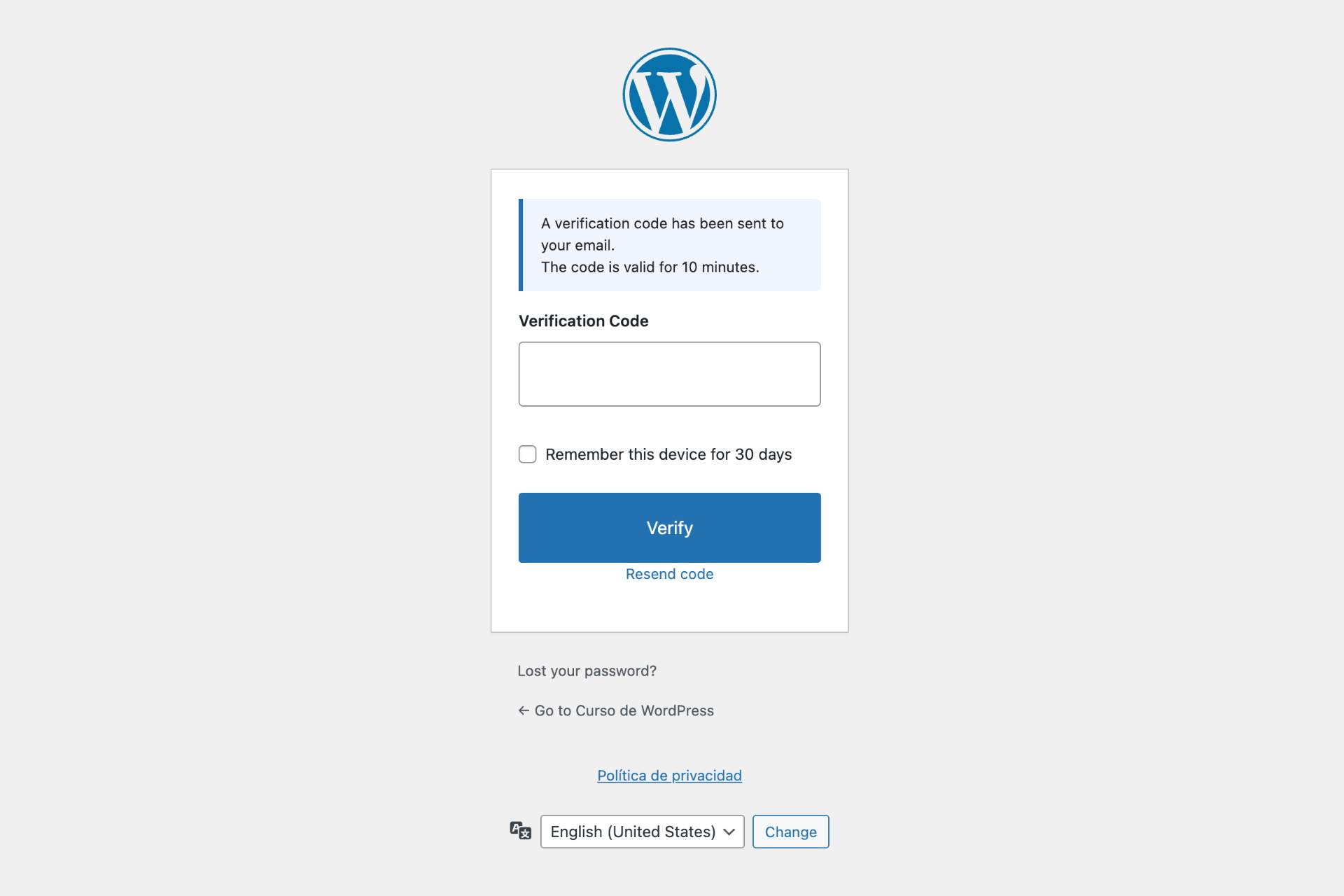
Authenticator app (TOTP) or email codes. QR code setup, backup codes, grace period. Trusted devices. Role-based enforcement. Admin reset tool.

03

Login security

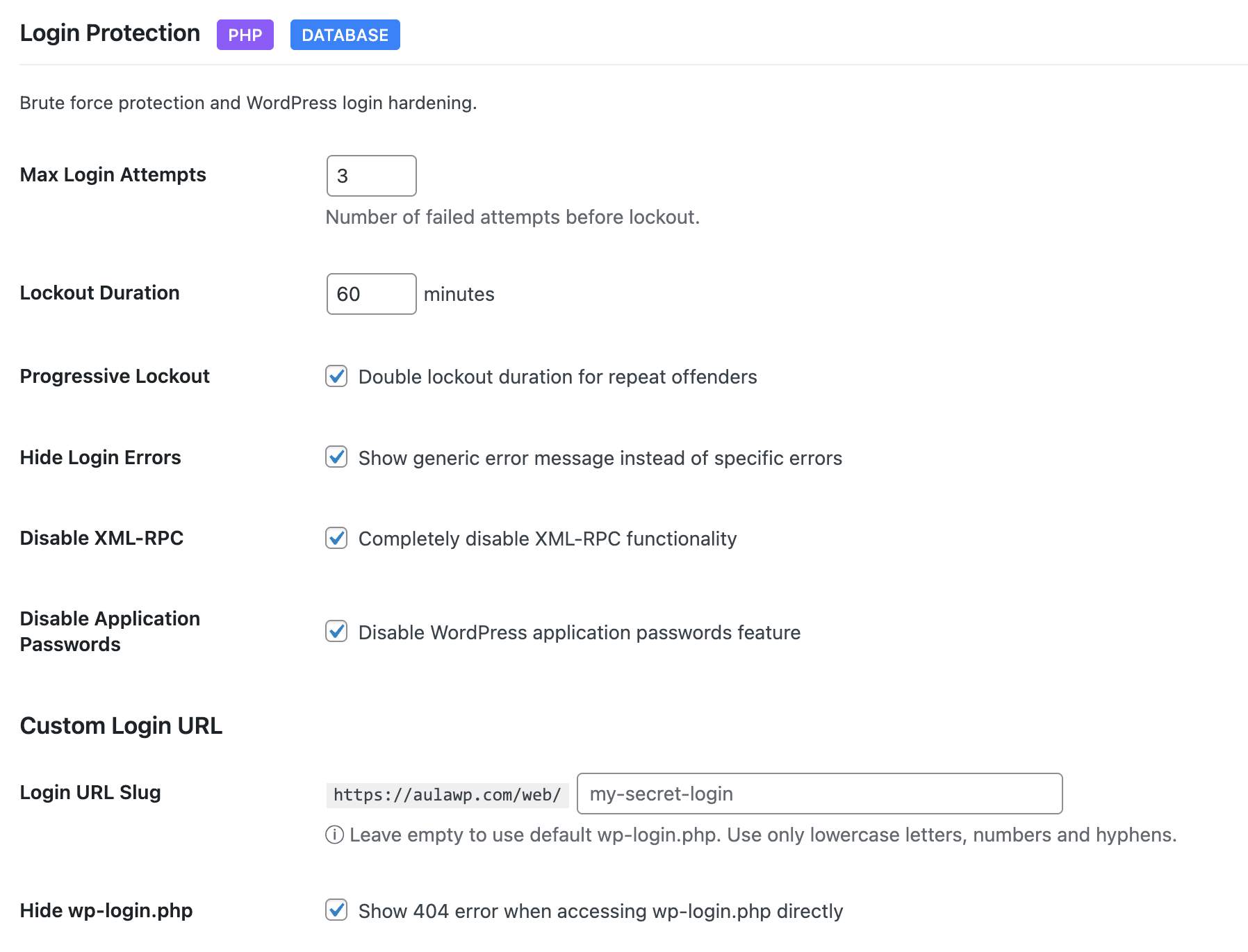
Brute force protection with progressive lockouts. Custom login URL. XML-RPC control. Admin login notifications. Failed attempt tracking per IP.

04

User security

Granular password policy: toggle each requirement on its own, disallow the username inside the password and scope it by role. Password expiration with history. Force password reset by role or individually. Session limits. Registration approval and email verification. Admin account monitoring. Display name protection.

05

Security headers

CSP with visual builder, report-only mode and Gutenberg compatibility. HSTS, X-Frame-Options, Permissions Policy, COEP/COOP/CORP. Built-in testing tool.

06

File integrity

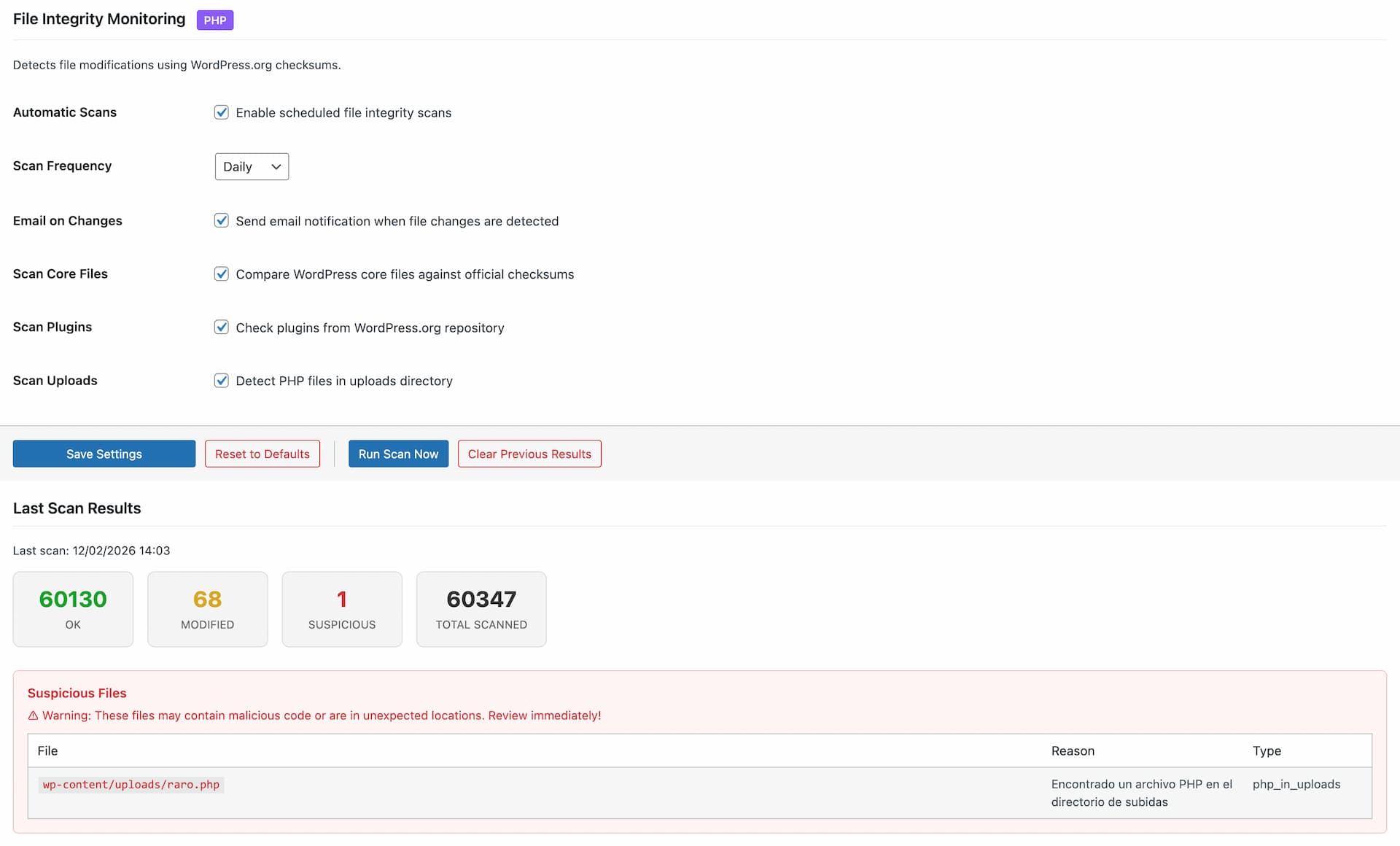
WordPress core, plugins and themes monitoring, verified again the instant an update finishes and opening every scan with a self-protection check on Vigilant's own files. Check for closed and removed plugins. Baseline monitoring for wp-config.php and .htaccess with line-level diff view. Two-level suspicious code analysis. Instant alerts and HTML email reports.

07

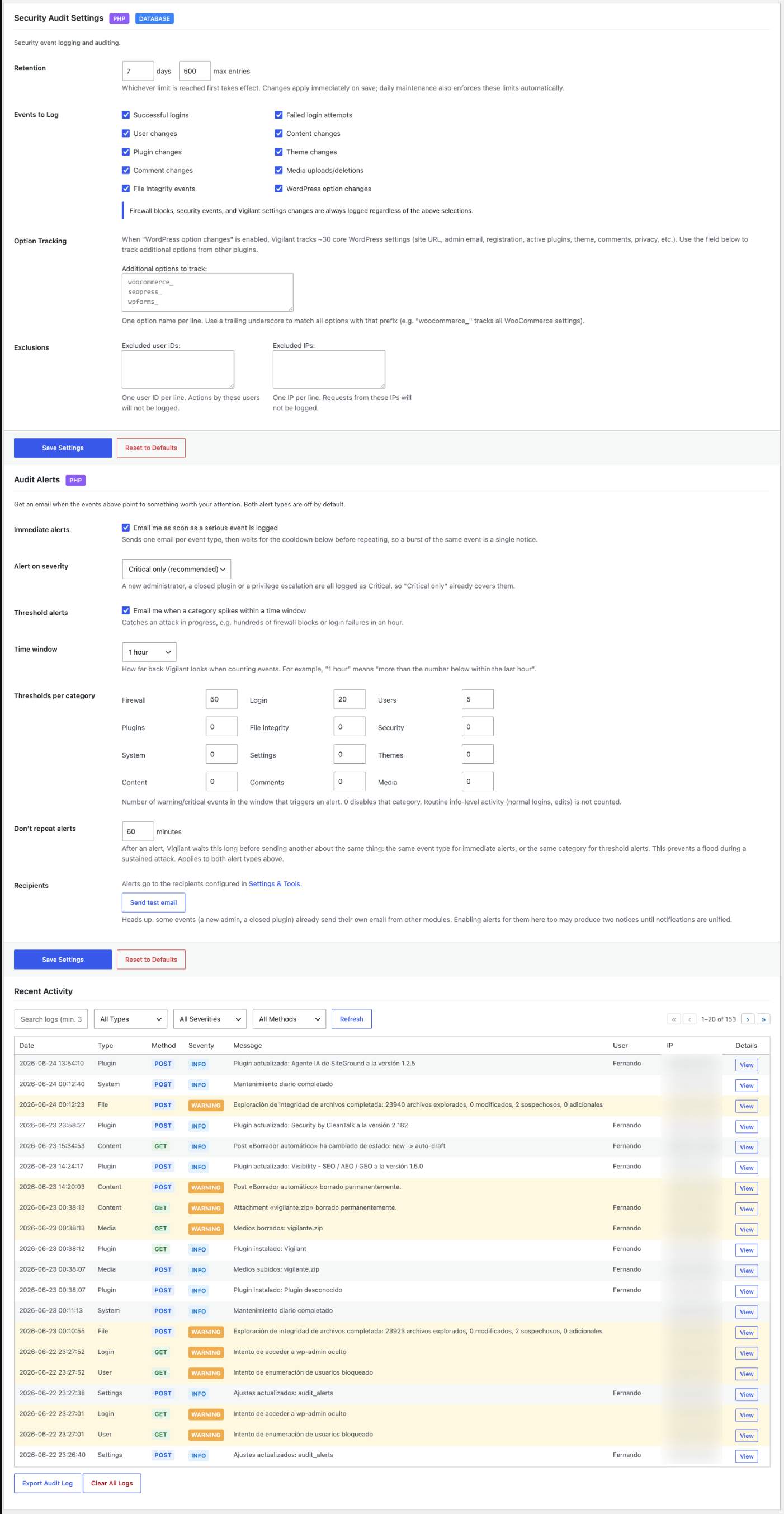
Activity log

Track logins, user changes, content edits and plugin activations. HTTP method tracking. Quick actions to firewall. AbuseIPDB lookup. Full-text search by IP, user agent or username. CSV export. Audit Alerts email you by severity, with per-category spike thresholds and anti-flood cooldown.

08

REST API security

Three access modes: public, authenticated, or fully blocked. User enumeration blocking. Compatibility presets for WooCommerce, Contact Form 7 and Elementor.

09

Under Attack mode

One-click emergency protection with JavaScript challenge, aggressive rate limiting, HTTP method restriction, and auto-deactivation after 4 hours.

10

Database security

Download full or partial database backups as ZIP with table selection and live size calculation. Change the default wp_ prefix to a random secure prefix with one click.

11

Security Analyzer

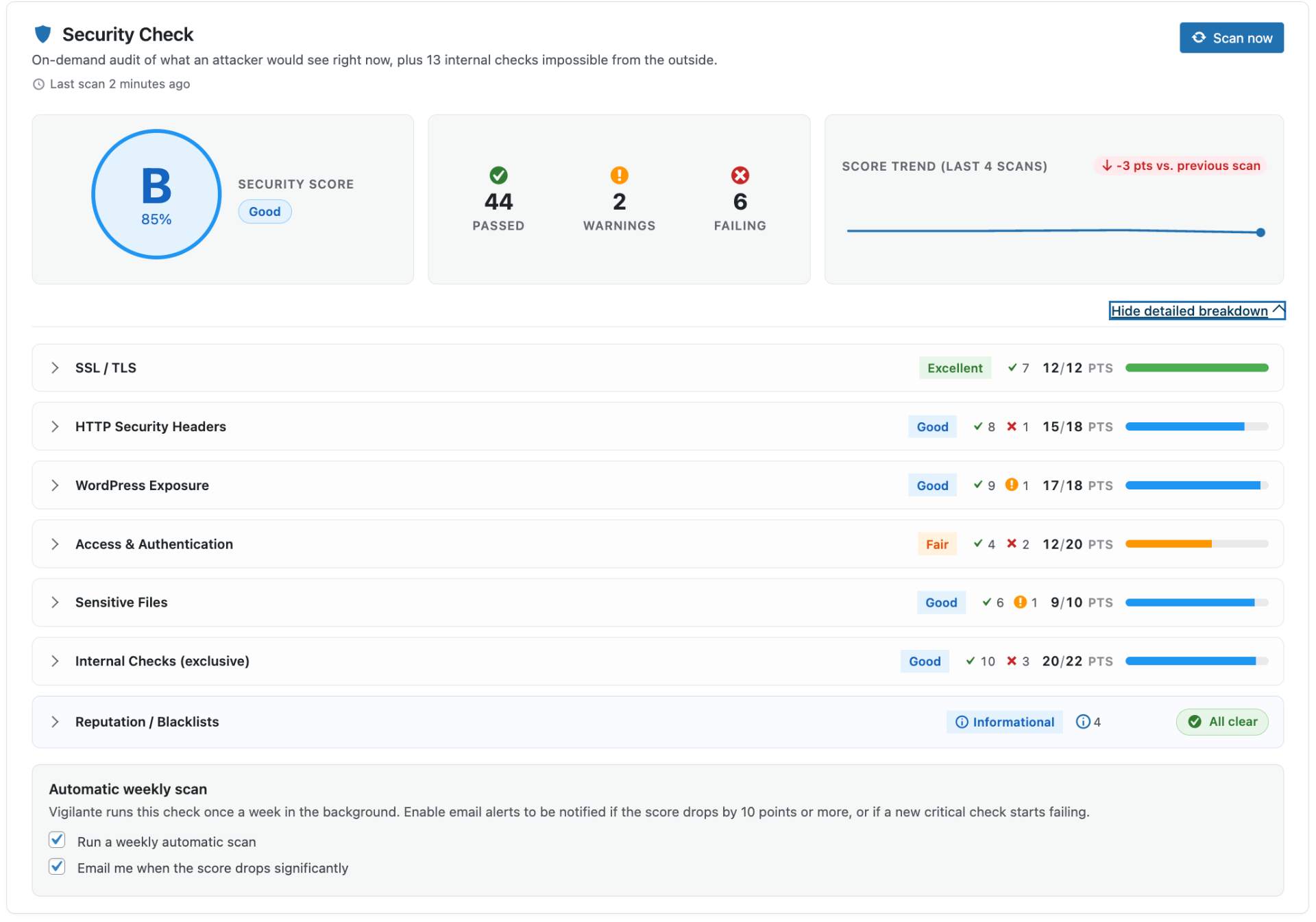
On-demand audit scored 0–100 with A–E grade. 40+ checks in 6 categories, 14 of them internal-only, now including a self-protection check that can't be disabled. Weekly scan with regression alert. Score history and direct links to the exact setting.

12

Self-protection

Verifies its own files against three references (the SHA-256 checksums WordPress.org publishes for the installed version, a manifest shipped inside the plugin, and a fingerprint of that manifest in the database) on every File Integrity scan, after every update, and once a day. Flags modified, missing or added files, dangerous file types, and any attempt to disable the check. One-click repair restores clean files from WordPress.org without touching your settings, tables or logs.

Features no one else offers free

These capabilities are either premium-only or completely unavailable in competing plugins.

✓ Security Analyzer audit with 40+ checks across 6 categories and 0–100 score
✓ 14 exclusive internal checks (PHP EOL, salts, 2FA, file permissions, table prefix, closed plugins, etc.)
✓ Closed plugins detection with closure reason and per-slug Ignore
✓ Self-protection check against three references (WordPress.org checksums, a signed manifest and a database fingerprint) with no setting to disable it
✓ Scheduled task watchdog that re-creates and logs any of Vigilant's own cron jobs someone removed
✓ One-click repair that restores clean plugin files from WordPress.org without touching your settings, tables or log
✓ Weekly automatic scan with opt-in regression email (only alerts on real drops)
✓ 30-scan score history with sparkline and delta chip
✓ "Go to setting" fix links that jump to the exact Vigilant field with a visual pulse
✓ DNS-only reputation check against Spamhaus ZEN, Barracuda BRBL and SpamCop SCBL
✓ Audit Alerts by event severity, with per-category spike thresholds (1/6/24h) and anti-flood cooldown
✓ Smart headers diagnostic detects "configured but not being served" cache/CDN overrides
✓ Complete CSP with report-only mode and Gutenberg compatibility
✓ Cross-Origin policies (COEP, COOP, CORP)
✓ Permissions Policy (camera, mic, geolocation)
✓ CSP compatibility checker tool
✓ REST API with 3 modes + plugin presets
✓ Progressive lockouts (escalating blocks)
✓ Concurrent session limits with configurable behavior
✓ Password expiration with warning period and history
✓ Granular password policy: toggle each requirement individually
✓ Disallow the username inside the password
✓ GDPR-compliant 2FA (no IP storage)
✓ Mixed content fixer (scripts, styles, attachments)
✓ Security-focused wp-config.php management from dashboard
✓ Automatic backup system with retention control
✓ Under Attack mode with JavaScript challenge and proof-of-work verification
✓ HMAC-signed cookies for verified visitors
✓ Emergency rate limiting (30 req/min) with auto-deactivation
✓ Root directory scanning for non-core PHP files (common attack vector)
✓ Smart .htaccess classification in uploads directory
✓ Display name protection prevents username exposure
✓ WP_DEBUG active warning in security dashboard with score penalty
✓ Force password reset by role or individually for targeted incident response
✓ Critical config file baseline monitoring — detects unauthorized changes to wp-config.php and .htaccess (gap left by WordPress.org checksums)
✓ Line-level diff view with line numbers — injected code is immediately visible
✓ Per-file approve workflow — review the diff and approve legitimate changes, recorded in Security Audit
✓ Instant settings search — find any option across all tabs with client-side matching and direct links to the exact section
✓ Opt-in wp-cron.php external block via .htaccess — denies direct HTTP access and stops cron-spam DoS abuse (for sites with real server-side cron)
✓ Opt-in DISABLE_WP_CRON toggle from the dashboard — pairs with the .htaccess block for full coverage when running server-side cron

Clean, intuitive interface

A dashboard designed for clarity, not complexity.
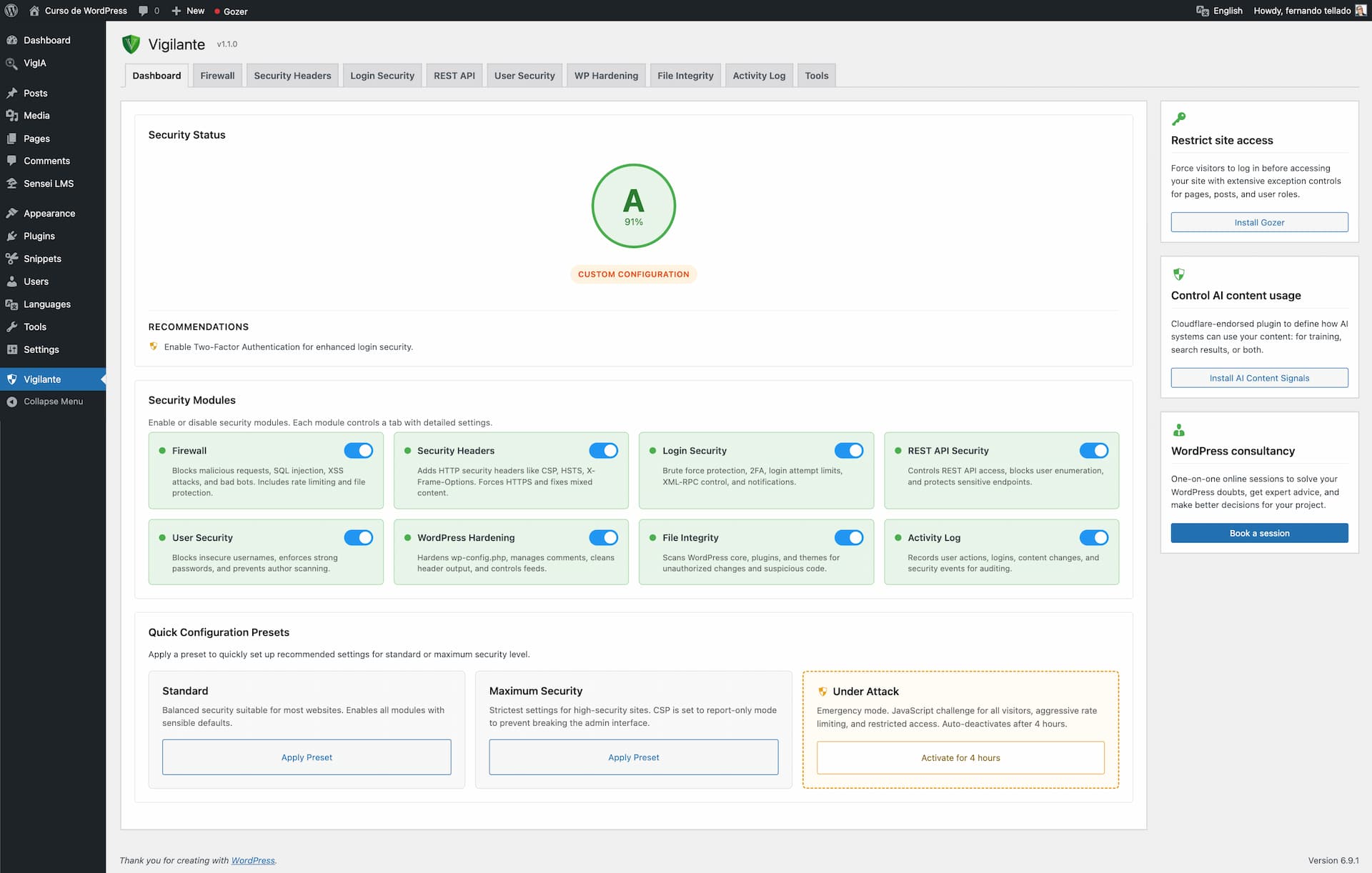
Security Dashboard
Security dashboard with score and module controls
Security Analyzer audit widget
Security Analyzer audit widget with 0–100 score, category breakdown and fix links
Two-Factor Authentication
Two-factor authentication settings
Login Security
Login security and brute force protection
File Integrity
File integrity scanner results
Activity Log
Activity log with filters and export

Common questions

Yes. All 194 features are included with no restrictions. There's no premium version, no feature limitations, no trial period. Vigilant is and will remain completely free.
Security Analyzer is an on-demand audit built into the Dashboard. It runs 40+ checks across 6 categories and returns a 0–100 score with an A–E grade. Unlike external online scanners it runs entirely on your server, so it can access 14 internal checks no outside tool can see: PHP end-of-life status, pending updates, inactive plugins, closed or removed plugins in the WordPress.org repository, file permissions, default salts, wp_ table prefix, admin username, administrators without 2FA enrolled, and more. The only external traffic is three DNS-only reputation lookups (Spamhaus, Barracuda, SpamCop) that you can disable. No API keys, no accounts, no data sent to us.
Once a day Vigilant queries the WordPress.org plugin API for the slug of every installed plugin, active or inactive, and flags any one listed as closed by the repository team. Closures usually mean an active malware finding, an unpatched vulnerability, a guideline violation or a supply chain compromise — and the site keeps running the affected code until you uninstall it. Vigilant also tracks state, so if wp.org hides the metadata entirely (a 404 typical of Security Issue takedowns) the plugin is still flagged as removed. Closed plugins appear in a dedicated subsection of File Integrity with closure date and reason, are logged in Security Audit with critical severity, are included in the file integrity email digest, and lower the score in Security Analyzer. Plugins that have never been in the WordPress.org repository (premium, custom) are ignored silently, and you can mute specific slugs you can’t uninstall yet with the per-slug Ignore option.
Every File Integrity scan opens with a self-protection check that verifies Vigilant's own files against three references: the SHA-256 checksums WordPress.org publishes for the installed version, a manifest shipped inside the plugin, and a fingerprint of that manifest stored in the database. It also runs after every update, including one applied by uploading a zip, and once a day if nothing else has checked in the last 24 hours. There's no setting to turn it off. A security plugin that can be told to stop watching its own code has a switch whose only real user is whoever just changed it. A critical finding always sends an email, separate from the File Integrity report and its notification setting, and one click restores clean files from WordPress.org without touching your settings, tables or log.
Audit Alerts email you the moment something on the site deserves attention, and they're off by default. Immediate alerts fire on serious events by severity: a new administrator, a closed plugin or a privilege escalation are logged as Critical and sent right away. Threshold alerts watch for a spike of warning or critical events in a category (firewall, login, users, plugins, file integrity and more) within a 1, 6 or 24 hour window, ignoring routine info-level activity. A per-event and per-category cooldown collapses a storm of events into a single notice instead of flooding your inbox, and a "Send test email" button confirms the messages actually reach you.
We believe basic security shouldn't be a luxury. Vigilant is created by AyudaWP, a WordPress community that has been helping users for over 20 years. We offer professional maintenance services for those who need hands-on support.
No. Vigilant is optimized for performance. The firewall uses efficient pattern matching, database queries are cached with transients, and .htaccess rules execute at server level before PHP even loads.
While Vigilant works standalone, running multiple security plugins can cause conflicts. We recommend testing in a staging environment first if you need to combine security solutions.
Yes. Vigilant includes compatibility settings for WooCommerce. The REST API security module automatically allows WooCommerce endpoints, and the firewall won't block payment gateway connections.
Under Attack mode is an emergency feature you activate with one click when your site is under active attack. It forces every unverified visitor to pass a JavaScript challenge before accessing your site. Bots and automated scripts are blocked completely, while real browsers solve it in seconds. It also enables aggressive rate limiting, blocks unsafe HTTP methods, locks down XML-RPC and REST API, and auto-deactivates after 4 hours. Logged-in users, admin pages, and cron jobs are never affected.
All security modifications are automatically reverted. The .htaccess rules are removed, wp-config.php constants are restored to their original values, and scheduled tasks are cleared. Your site returns to its pre-Vigilant state.
Access your site via FTP/SFTP and either rename the plugin folder to disable it temporarily, or delete the vigilante_login_attempts table rows for your IP address in the database.
Only if your hosting runs a real server-side cron (a system cron job hitting wp-cron.php on a schedule). Vigilant adds two opt-in protections, both off by default: the .htaccess block in Firewall → File Protection denies direct external HTTP access to wp-cron.php and stops cron-spam DoS abuse, and the DISABLE_WP_CRON toggle in WP Hardening prevents WordPress from spawning cron from page views. Enable them together when you have server-side cron configured. If you don't, scheduled tasks (publishing posts, backups, automatic updates) will stop running.
Vigilant works on Apache and LiteSpeed servers (for .htaccess features). The PHP-based firewall and all other features work on any server including Nginx. Requires WordPress 6.2+ and PHP 7.4+.

Created by Fernando Tellado

Vigilant is a project by Ayuda WordPress, the largest Spanish-speaking WordPress community, created by Fernando Tellado who has been helping WordPress users for over 20 years with tutorials, guides, and plugins.

We create tools that solve real problems. No gimmicks, no unnecessary subscriptions, no data collection. Plugins that work. Period.

Need professional help with your WordPress? Our team offers maintenance services so you can focus on what matters.

+20
Years with WordPress
194
Security features
100%
Free
0
Third-party data sharing

AyudaWP.com resources

Part of a plugin family

Vigilant works on its own, but these free plugins by the same author pair up nicely. Each one handles its own job, so nothing overlaps or duplicates.

Start protecting today

Install Vigilant in under a minute. It's free, requires no account, and your data never leaves your server.